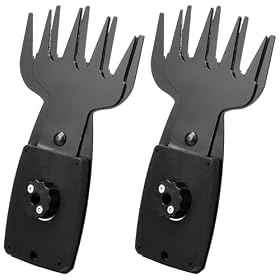
Hedge trimmer blades should never be used against fence wire. Shut off and isolate the trimmer, inspect the blade and housing for damage, then hand-prune vegetation close to the wire or replace damaged parts before using the tool again.
Hedge trimmer blades hitting fence wire is a safety and equipment-damage problem, not a normal operating condition. Stop the trimmer immediately, disconnect the battery or unplug it, and do not use the blades to cut, pull, or free wire. A collision can bend the blade, damage the drive mechanism, throw metal fragments, or leave the wire hidden in the hedge.
Stop and isolate the trimmer
Release the trigger and wait for the blades to stop completely.
Remove the battery, unplug the cord, or follow the manufacturer’s shutdown procedure.
Keep your hands away from the blade teeth until the power source is isolated.
If wire is wrapped around the blade, do not pull it free while the trimmer is connected to power.
Wear cut-resistant work gloves and eye protection while inspecting the tool, unless the manufacturer specifies different protective equipment.
If the wire is under tension or part of a damaged fence, keep clear and have the fence repaired by someone qualified.
Inspect the wire first
Find the full length of the fence wire in the work area. Wire can disappear into dense growth after it bends or breaks, so do not assume the visible section is the only hazard.
Before trimming again:
Mark the wire with visible flagging or another suitable marker.
Remove loose vegetation around it by hand pruners, keeping the trimmer well away from the wire.
Check for broken ends, staples, clips, and protruding strands.
Avoid pulling on wire that may be attached to a post under tension.
The safest method is to use hand pruners or loppers around the fence line and use the hedge trimmer only where the blades have clear space.
Product prices and availability are accurate as of the date/time indicated and are subject to change. Any price and availability information displayed on Amazon.com at the time of purchase will apply to the purchase of this product.
Check the blade for damage
With the trimmer isolated from power, clean away leaves and debris so you can see the blade rails, teeth, and fasteners. Look for:
Bent, twisted, chipped, or missing teeth
A blade rail that no longer looks straight
Scrape marks or raised metal on the blade
Loose screws, nuts, spacers, or blade covers
Cracks in the blade assembly or nearby housing
Excessive side-to-side movement
A blade that does not move freely by hand when the manufacturer’s instructions allow this check
Do not run the trimmer to see whether a damaged blade is still usable. Do not grind, file, heat, or hammer the blade unless the manufacturer specifically provides that repair procedure. A hedge trimmer blade is a matched moving assembly, and altering one part can affect clearance and balance.
Replace the blade assembly if it is bent, cracked, missing teeth, or visibly distorted. Use a replacement specified for the exact trimmer model; blade length, tooth spacing, mounting pattern, and drive connection are not universal.
Product prices and availability are accurate as of the date/time indicated and are subject to change. Any price and availability information displayed on Amazon.com at the time of purchase will apply to the purchase of this product.
Look for a jam or hidden wire
Small wire fragments can remain between the blade rails or inside the front guard. After isolating power, remove only debris that can be reached safely without forcing the blade. Do not insert fingers or tools into a tight gap.
If the blade is locked, the motor housing is damaged, or wire is wrapped around the drive area, stop and consult the manufacturer’s service instructions. A service technician may be needed, particularly if the tool was running when the wire was struck.
Check for signs of a drive or motor problem
A wire strike may damage more than the blade. After the blade has been inspected and any required part has been installed, watch for these symptoms during a brief test in a clear area:
Grinding, clicking, or knocking sounds
Blades that move unevenly or stop under light load
Strong vibration through the handles
A burning smell, smoke, or unusual heat
A motor that runs but does not drive the blades
A cordless trimmer that shuts off repeatedly after the collision
Stop immediately if any of these occur. Do not bypass a safety switch, continue using a trimmer that smells burned, or open the motor and electrical housing unless you are qualified and the manufacturer permits that service. Electrical faults and damaged battery equipment should be handled according to the manual or by a qualified repair professional.
Prevent another collision
Before each trimming session, walk the hedge line and identify hidden obstacles. Fence wire, chain-link edges, metal posts, landscape edging, old plant supports, and irrigation components can all damage hedge trimmer blades.
Use these habits:
Hand-prune a clearance zone beside the fence.
Trim from the open side when that keeps the blade away from the wire.
Keep the blade at an angle that does not push foliage into the fence.
Do not rely on a blade tip or guard to protect against metal contact.
Keep bystanders away from the opposite side of the hedge, where wire or debris may be thrown.
Store the tool with its blade sheath fitted after the blade has stopped and cooled as directed by the manufacturer.
A hedge trimmer is designed for plant material, not metal. Even if a brief contact appears harmless, repeated impacts can dull or deform the teeth and increase vibration.
When replacement is the sensible next step
Replace the blade when it is visibly bent, cracked, badly nicked, or no longer runs with even clearance. Replacement is also reasonable when sharpening or adjustment cannot restore smooth, low-vibration operation.
Consider replacing the trimmer rather than only the blade if the collision damaged the blade drive, gear case, motor housing, safety switch, or battery compartment, or if compatible replacement parts are unavailable. If the tool is still under warranty, document the damage and contact the manufacturer before disassembling it.
If the blade is straight and the trimmer runs quietly after a careful inspection, continue using it only in vegetation that is clear of wire and other hard objects. Any doubt about structural damage is a reason to stop and seek service.
FAQ
Can a hedge trimmer cut through fence wire?
No. Hedge trimmer blades are intended for plant material, not metal. Cutting or striking fence wire can damage the blade, drive mechanism, housing, or battery-powered tool and may create flying fragments.
What should I do if wire is wrapped around my hedge trimmer blade?
Release the trigger, wait for the blades to stop, and disconnect the battery or unplug the trimmer before touching it. Do not pull on tightly wound wire or force the blade. Follow the manufacturer’s jam-removal instructions or use a qualified repair service.
Can I keep using a hedge trimmer after it hits wire?
Only after isolating the tool and checking for bent teeth, cracks, loose hardware, abnormal blade movement, and housing or drive damage. Replace a damaged blade and stop using the trimmer if it vibrates, grinds, smells burned, or operates unevenly.
How can I trim a hedge that grows through a wire fence?
Use hand pruners or loppers to clear growth immediately beside and through the wire. Use the hedge trimmer only in sections where the blade has clear separation from the fence.